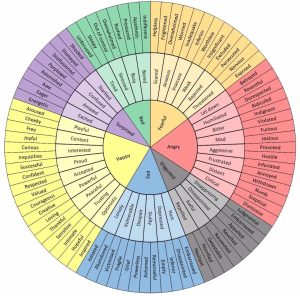
 In part 2 of the Our Minds Matter series, with Dr Malvika Behl we discussed the feelings chart and the impact of their range and intensity. It was great learning how to identify the underlying causes of different feelings and how we can start to manage them through acceptance, processing and then moving forward with them. We were pleased to see new faces join the session to see how we can better look after our beautiful minds. Here is the emotions wheel that Malvika spoke about in her talk.
Here are the slide from the Our Mind Matters Series Part 2
Watch part one here.
Meet Dr. Malvika Behl, an invaluable member of our team. As Associate Professor and Chair of the Counsellor Education Program at West Texas A&M University, her extensive expertise shines through. With a PhD in Counsellor Education and Supervision, Malvika brings a wealth of knowledge and seven years of academic experience, teaching various counselling courses. Driven by a passion for supporting individuals with learning disabilities, Malvika has been actively involved in counselling since 2013. Her dedication extends globally, collaborating with esteemed organizations such as the Centre for Learning Disabilities, Partners Resource Network, Maharashtra Dyslexia Association, and Dyslexia Organisation Kenya. With her guidance and expertise, we’re poised to make a meaningful impact on your journey towards thriving mental health and well-being.
This episode contains sensitive discussions if you find any of this content distressing, seek support:
- Life Line on 13 11 14
- BeyondBlue counsellor on 1300 22 4636.
Other helpful resources: